Autoscaling based on CPU/Memory in Kubernetes
Autoscaling based on CPU/Memory in Kubernetes — Part II
In Part I , we have discussed about:
- Setting up a cluster,
- Creating Deployments, and
- Accessing the services.
In this part, we are going to show how you can autoscale the pods on the CPU/Memory based metrics.
CPU Based Scaling
With Horizontal Pod Autoscaling, Kubernetes automatically scales the number of pods in a replication controller, deployment or replica set based on observed CPU utilisation.
Execute the command: “kubectl get deployment” to get the existing deployments.
Create a Horizontal Pod Autoscaler i.e. hpa for a particular deployment using command:
kubectl autoscale deployment <deployment-name> --min=2 --max=5 --cpu-percent=80
Execute “kubectl get hpa” to get the available hpa in your cluster.

So, now we have a hpa running for our deployment “tomcat02”. It compares the arithmetic mean of the pods’ CPU utilization with the target defined in Spec.CPUUtilization, and adjusts the replicas of the Scale if needed to match the target (preserving condition: MinReplicas <= Replicas <= MaxReplicas). For more information on HPA, you can refer to this link here:
But, how you will update the minimum no. of replicas in an existing HPA? In our case, currently, we have set the minimum no. of replicas to 1, what if we need to update the min. no. of replicas to 2. In this scenerio, just we need to get the hpa in yaml format and update the yaml file. Here’s an example,
kubectl get hpa/tomcat02 -o yaml > tomcat-hpa.yamlvim tomcat-hpa.yaml
Update the count as highlighted in below screenshot:
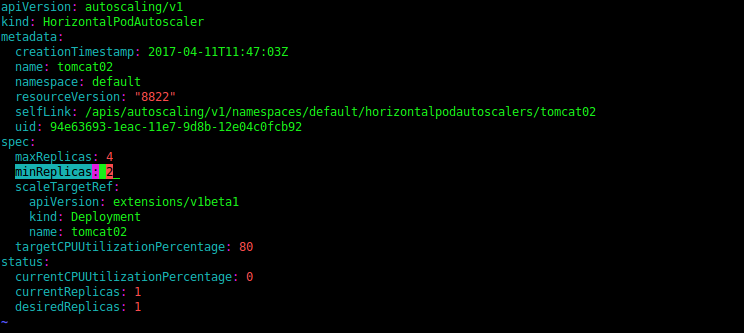
Save the yaml file and apply the changes:
kubectl apply -f tomcat-hpa.yaml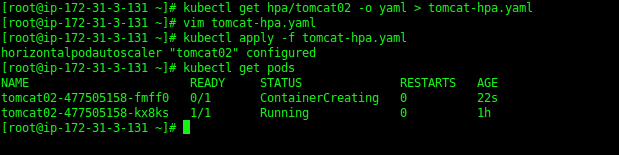
Once the changes have been applied, it will launch one more pod as shown in above screenshot.
Memory Based Scaling
Since its not possible to create memory based hpa in kubernetes, we have written a script to achieve the same. You can find our script here by clicking on this link:
Clone the repository :
and then go the kubernetes directory. Execute the help command to get the instructions:
./memory-based-autoscaling.sh --help

Pod Memory Based AutoScaling
In this section, we are discussing how you can deploy autoscaling on the basis of memory that pods are consuming. We have used the command “kubectl top pod” to get the utilized pod memory and applied the logic.
- Get the average pod memory of the running pods: Execute the script as follows:
./memory-based-autoscaling.sh --action get-podmemory --deployment <deploymentname>
Once this command is executed, you can check the logs in directory /var/log/kube-deploy/.

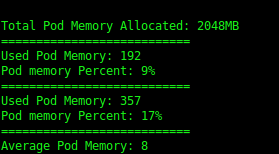
- Deploy autoscaling on the basis of pod memory: Execute the script as follows:
./memory-based-autoscaling.sh --action deploy-pod-autoscaling --deployment <deployment-name> --scaleup <scaleupthreshold> --scaledown <scaledownthreshold>
Check the same log file once the script is executed. If the average pod memory will cross the scaleup threshold, it will launch one more pod. Similarly, the Scale down policy condition will check two things:
- whether the average pod memory is less than the scaledown threshold, and
- if the no. of current pods is greater than the minimum count we have set while creating the hpa.
For example, if we have no. of pods running 3 and minimum count is 2, in this case the deployment will be scaled down if the average pod memory is less than the scaledown threshold. In other case, if we have two running pods and minimum is also set to 2, even if the average pod memory is less than the threshold, the deployment wont be scaled down.
Once you verify that the above actions are working fine, you can schedule the script as cronjob to execute at every 5 mins. Provide the full path of the script in crontab.
*/5 * * * * /bin/bash /opt/kubernetes/memory-based-autoscaling.sh --action deploy-pod-autoscaling --deployment xxxxxx --scaleup 80 --scaledown 20 > /dev/null 2>&1
Java Heap Memory Based AutoScaling
In case of Java Applications, heap memory plays a very important role. When a Java program starts, Java Virtual Machine gets some memory from Operating System. Java Virtual Machine or JVM uses this memory for all its need and part of this memory is call java heap memory. Whenever heap memory is full, it starts throwing java.lang.OutOfMemoryError: Java Heap Space error.
In this section, we are showing how you can deploy autoscaling on the basis of the heap memory that Java process is consuming. Once the heap memory crosses the threshold, one more pod will get launched.
Prerequisites:
- Ensure you have allocated the max heap memory to the JVM Process.
- Ensure that Jstat is installed in your docker image. Use the following commands to install “jstat” in Ubuntu / Debian OS:
- apt-get update
- apt install -t jessie-backports openjdk-8-jre-headless ca-certificates-java
- apt-get install -y openjdk-8-jdk
To update your deployment with the updated docker image, you can execute the below command:
kubectl set image deployment/<deploymentname> <containername>=<image>
You can verify that jstat is installed in your pod by executing jstat command as shown in below screenshot.
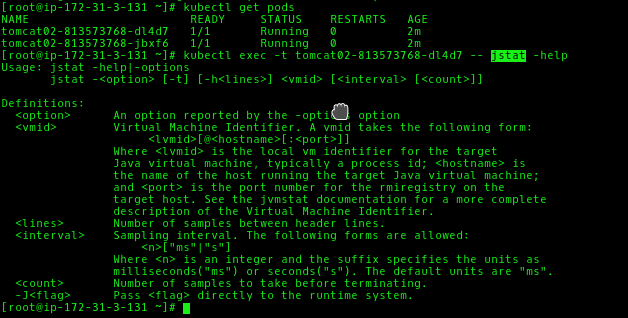
In the script, we are filtering for the Xmx value in the running jvm process to get the total heap memory, using the “jstat” command to get the utilized heap memory and applied the logic for autoscaling.
- Get the average heap memory of the running pods: You can verify the allocated memory by checking the -Xmx value in the running jvm process:
kubectl exec -t <podname> -- ps -ef | grep java
Execute the script as follows:
./memory-based-autoscaling.sh --action get-heapmemory --deployment <deployment-name>
and then check the logs in /var/log/kube-deploy. The log file name will have the deployment name included in it i.e. kube-deploymentname-date.log.

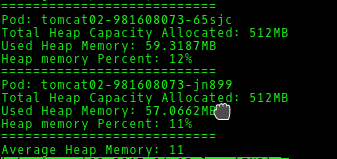
- Deploy autoscaling on the basis of heap memory: Execute the script as follows:
./memory-based-autoscaling.sh --action deploy-heap-autoscaling --deployment <deployment-name> --scaleup <scaleupthreshold> --scaledown <scaledownthreshold>
Check the same log file for the logs.
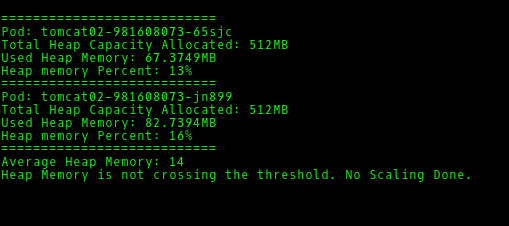
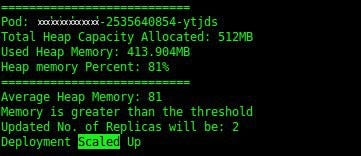
Once you verify all actions are working fine, you can schedule the script as cronjob to execute at every 5 mins. Provide the full path of the script.
*/5 * * * * /bin/bash /opt/kubernetes/memory-based-autoscaling.sh --action deploy-heap-autoscaling --deployment xxxxxx --scaleup 80 --scaledown 20 > /dev/null 2>&1
& that’s it. Hope you found it useful. Happy Pod Scaling..!! :)
Keep following us for further parts on Kubernetes..!!


Comments
Post a Comment